

Note
Go to the end to download the full example code.
Plot projection center on the detector#
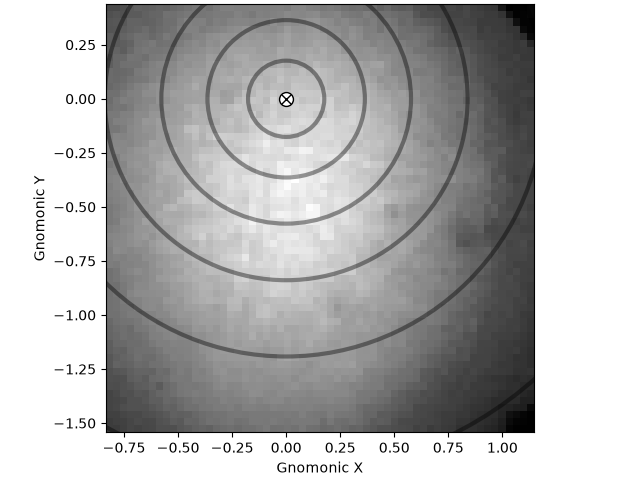
This example shows how to plot the projection/pattern center (PC) on an
EBSDDetector.
See the detector class documentation for further details on the definition of the PC and
gnomonic coordinates.
Imports.
import matplotlib.pyplot as plt

import kikuchipy as kp
Create an EBSD detector with a binning of 8 and a single projection/pattern (PC) center given in EDAX’ definition, \((x^{*}, y^{*}, z^{*}) = (0.421, 0.779, 0.505)\).
det = kp.detectors.EBSDDetector(
    shape=(60, 60),
    pc=[0.421, 0.779, 0.505],
    convention="edax",
    px_size=70,  # Microns
    tilt=5,  # Degrees
    sample_tilt=70,  # Degrees
    binning=8,
)
print(det)
EBSDDetector
  shape (Ny, Nx):     (60, 60)
  pc (PCx, PCy, PCz): (0.421, 0.221, 0.505)
  sample_tilt:        70.0°
  tilt:               5.0°
  azimuthal:          0.0°
  twist:              0.0°
  binning:            8
  px_size:            70.0 um
Load a small test dataset with (60, 60) patterns to plot the PC over.
s = kp.data.nickel_ebsd_small()
print(s)
<EBSD, title: patterns Scan 1, dimensions: (3, 3|60, 60)>
Plot the PC on top of the pattern. Instead of pixels, we show the detector extent in gnomonic coordinates along the x and y axes. We also draw gnomonic circles at an interval of \(10^{\circ}\).
Total running time of the script: (0 minutes 0.135 seconds)